Over the last two months, four local startups have reached out to me asking for advice on how to set up their first podcast. A lot has been written about the podcast resurgence, but I don't think anything tells the story better than that little nugget.
Anyway, I figured I would share what I've been sharing with them since it's easier to just send folks a link (see below; FYI that it's not fancy. Just copied and pasted from the email I've sent).
Remember a few years ago when social media marketing became a thing and all of these "social media experts" popped up? Well, the same thing is happening with podcasts now and it's annoying. There's a lot of information out there, everyone tells you the best way to do it, and often times, they charge a lot of money to help you. Below is the quick and easy way to start a podcast on a startup budget. One thing to keep in mind: it's easy to create great sounding audio. Throw some money at nice equipment. It's hard to create a great interview/story.
First, The Benchmarks To Know
According to Rob Walch VP of Podcaster Relations at libsyn.com (the largest podcast media hosting company) a podcast episode that has been live approximately 30 days averages 141 downloads.
The median monthly numbers for March 2015 were 170-180 and the mean was 1700-1900. The bar is not that high!
If you have over 3400 downloads you are in the top 10%. If you have over 9000 downloads you are in the top 5%.
Lastly, if you have over 50,000 downloads (after having it live for 30 days) you are in the top 1% (this would be the Marc Marron, Adam Corrola, Jay Mohr, etc).
The magic number seems to be 5,000 downloads/episode. Only 8.5% of ALL podcasts are in the magic number (magic because this is the number that gets interest from sponsors you've actually heard of).
How Does a Podcast Actually Get Into iTunes?
Record audio -> Create mp3/mp4 file -> Upload file to audio hosting service -> Get RSS feed to for that audio -> Submit feed to iTunes.
The good thing about the approach below is that as long as you have the mic (which fits in your backpack) and your laptop, you can record from anywhere when you travel.
How To Record Audio
Software
You can record right into Garageband or Quicktime on your mac - any audio recording software will do. Garageband is easy to use and gives you a few settings to play around with for the audio quality/editing. I know nothing about audio/editing and can play around in Garageband enough to edit, so would recommend that.
USB Microphone
For $50 on Amazon you can get a Blue Snowball Mic. This has worked great for me. There are three minor challenges 1) it's very sensitive, so you need to be in a room that is very quiet 2) it records what is directly in front of it, so you and the guest will need to sit right next to each other 3) you both need to speak loud - which can be hard for some people and isn't great if the guest doesn't project (it's easier for you as the host to control your voice). The Blue Yeti is also good, and the next level up the ladder.
If Your Guest is Remote
Skype is awesome for recording people not in-person. There's a $30 add-on for Skype that lets you record all of your calls. Call them and use your Blue mic and headphones in a quiet room and it will sound pretty good. Chances are they don't have a mic, but their headphones or a headset in a quiet room will do. Skype will widen your pool of potential guests, too.
Podcast RSS Feed
Podcasts run off an RSS feed. Once you have your feed, you submit the link, show description and nice image to the iTunes directory. Unlike the typical RSS feed that you might plug into an RSS reader like Feedly, this feed contains just the audio. You can code your own feed, but there are plenty of services that do this for you - all you need to do is upload your audio file. That leads us to SoundCloud or Libsyn.
SoundCloud or Libsyn
SoundCloud is free until you upload 3 hours of audio, and once you hit that threshold with the free account, they lock your files - it's something like $15/month for Pro, which will give you unlimited space and all of the stats you'll need. They have a podcast setting - which has been in beta for a year - which means nothing other than it's just a little bit hidden to find your RSS feed after you upload it (hidden in Settings). Libsyn is a dedicated platform for podcasts - I've read good things about it, so you could also upload your audio there as well and get the podcast feed and stats. (I use SoundCloud and would probably just do that - plus the embed code looks great on the web and their Twitter integration looks great in a Twitter card when you share it).
Cover Art
iTunes requires a logo/cover art that is 1400 x 1400 pixels and a maximum size of 2048 x 2048 pixels - they have more information about this in their FAQ's, but any designer should be able to whip that up in two seconds (or you can figure out how to use Canva).
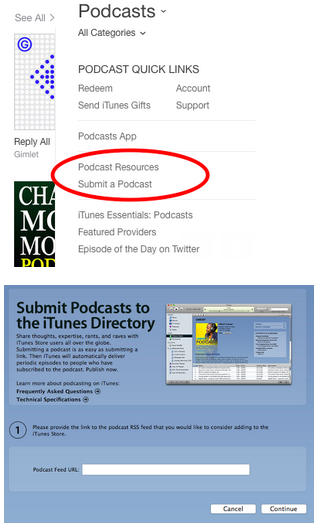
Then you will be good to submit to iTunes - just click on Podcasts and on the right side you'll see where you can submit.